Idle game for iPhone
Grow the tree. Sell the honey. Come back for more.
Bees fill each floor of a giant tree. A lift brings the honey down. Carriers sell it at the fair for coins. Hire managers, close the app, and the tree keeps a slower income until you return.
The App Store page is not live yet. This button will open it when the listing is up. The game is free to download, with optional purchases.
Free to download on the App Store. Optional purchases inside the game.
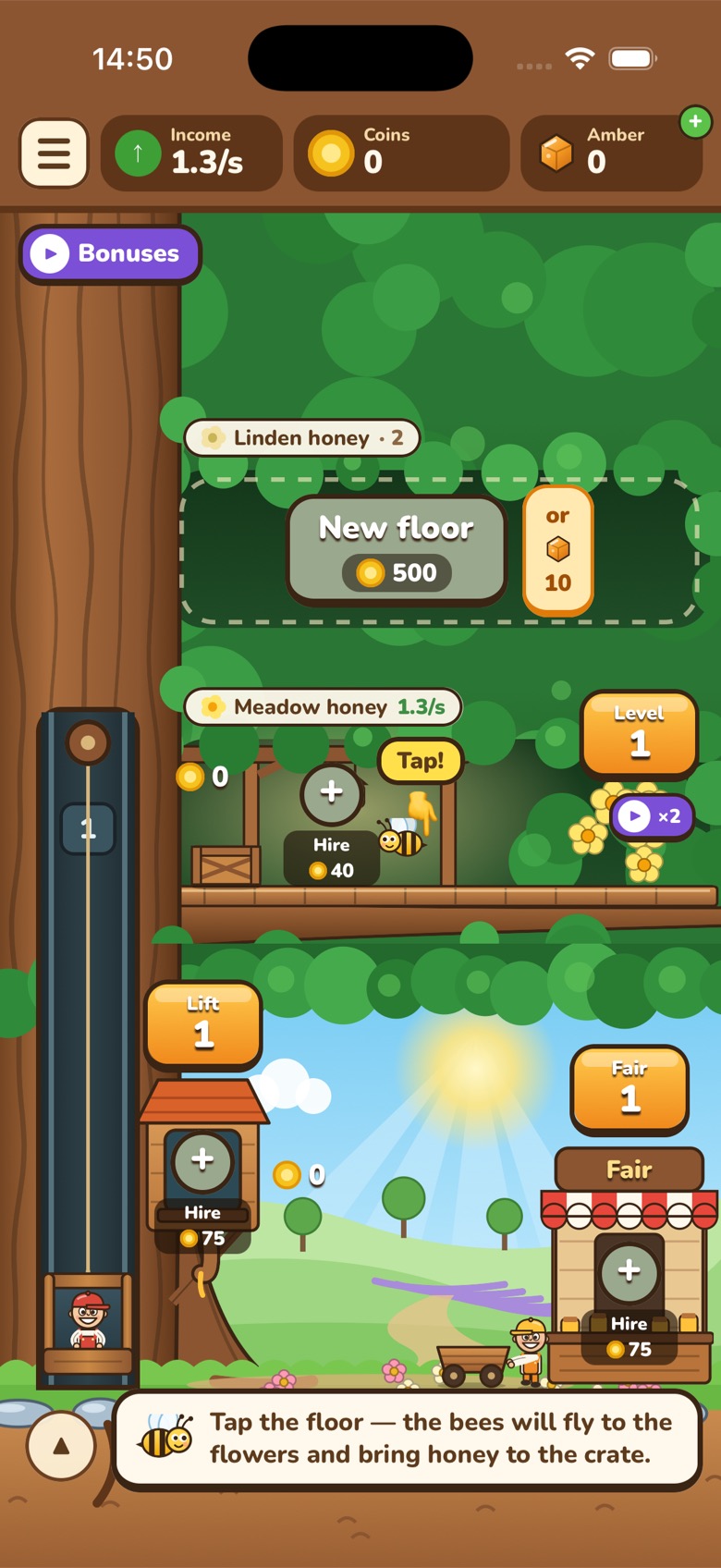
One trip, from the flowers to the fair
You do this by hand at first. Each step is a button on the tree. Then a manager can take that step for you.
-
1
Bees fill a floor
Tap a floor and the bees fly to the flowers. They bring honey back to a crate. A floor can hold up to four bees, and a higher level means more honey per trip.
-
2
The lift comes down
Tap the lift and the operator rides up the trunk, picks up honey from the floors that have some, and brings the load down.
-
3
The fair pays coins
Carriers walk the honey to the fair and sell it. Those coins are what you spend. Spain’s coins stay on Spain’s tree.
-
4
Build the next floor up
The tree has 40 floors, and each one is a different honey, from meadow and linden up to lavender, chestnut and manuka. Higher floors are worth more. Some of them take an hour to grow, and the floors you already have keep working while you wait.
It keeps going after you leave
This is an idle game. The point of the managers is that you do not have to sit and tap.
- A manager on a floor keeps those bees collecting.
- A manager on the lift and a manager on the fair keep the honey moving and selling.
- Come back after about five minutes and the game pays what those managers earned while the app was closed.
- Away income is slower than playing with the app open, and it stops counting after 8 hours. It waits for you. It does not pile up forever.
The second tree
Spain is home. The USA is the next job.
You start in a meadow in Spain. After the map opens, the USA can be unlocked with coins. It is a fruit orchard, not a second honey tree.
- Squirrels pick the fruit instead of bees.
- The USA has its own green coins. Spending them does not touch your Spanish coins.
- Every five floors bring a new fruit: apples, pears, oranges, lemons, peaches, cherries, mangoes and starfruit, including real varieties such as Gala, Fuji and Honeycrisp.
- Prices are three times higher, so it takes longer on purpose.
France, Brazil, China, Japan and Australia are drawn on the map. They are marked coming soon and open in a later update. They are not playable yet.
Straight answers
- You can play without paying
- Coins from the fair pay for levels, managers and new floors. A higher level is also how a floor gets more bees, up to four. Amber is optional. The game gives a little once a day, and packs are sold by Apple. Apple handles the payment, and refunds go through Apple.
- There is no account
- Progress and settings stay on your iPhone. Deleting the app deletes them. Starting over on a tree erases that tree. There is nothing to sign in to, and nothing to restore from a cloud save.
- It is made for iPhone
- The game is portrait, for the phone. It includes 18 languages: English, Ukrainian, Spanish, Portuguese, French, German, Italian, Polish, Dutch, Czech, Romanian, Turkish, Indonesian, Thai, Vietnamese, Japanese, Korean and Simplified Chinese.
- The listing is not up yet
- There is no App Store page to open today. When there is, the buttons on this page will point to it. Questions can go to contact@arktik.tech.
Support
Write to us
Questions, bugs or a purchase that did not arrive? Write to contact@arktik.tech and include your device model and, if possible, a screenshot.
I bought amber but did not receive it
Make sure you are online, then close the game completely and open it again. The game checks for unfinished purchases every time it starts and adds the missing amber automatically.
How do I get a refund?
Payments are handled by Apple. Request a refund at reportaproblem.apple.com.
Where is my progress saved?
On your device. Deleting the app deletes your progress.
How do I turn off in-app purchases?
On iPhone go to Settings → Screen Time → Content & Privacy Restrictions → iTunes & App Store Purchases.
Privacy Policy
Effective date: 12 October 2026
This policy explains what information the game Honey Tree Tycoon (“the app”), made by Artem Kurtiak (“we”), handles and why. The short version: you never create an account, we never ask for your name or email, your game progress stays on your device, and we do not sell or share data for advertising.
Information stored on your device
Your game progress and settings (sound, music, language) are saved only on your device. We do not receive them. They are deleted when you delete the app.
In-app purchases
Amber packs are sold through Apple’s App Store. Apple processes the payment; we never see your name, Apple ID, card or billing details.
To confirm a purchase and give you the amber you bought, the app uses RevenueCat, a purchase-validation service. When the app starts or you buy something, RevenueCat receives:
- your purchase history in this app (which pack, when, the App Store transaction);
- a random anonymous ID created by the app — it is not linked to your name, email or Apple ID;
- basic technical information sent with any internet request, such as app version, device model, iOS version, App Store country and IP address.
We use this only to deliver purchases, restore purchases that did not finish, prevent fraud and see overall sales numbers. It is not used to identify you or to track you across other apps or websites.
Advertising and tracking
The app does not contain third-party advertising or analytics SDKs and does not track you across apps or websites. It does not access your advertising identifier (IDFA), contacts, location, camera, microphone or photos. If this ever changes, we will update this policy first.
Some bonuses are offered after a short reward screen inside the game. That screen is part of the game. It is not an advertisement from another company, and it does not send anything to an ad network.
Apple
If you have allowed it in iOS settings, Apple may share anonymous crash reports and usage statistics with developers. This is controlled by Apple and covered by Apple’s privacy policy.
Children
The app does not ask anyone, including children, for personal information. We do not knowingly collect personal information from children. Purchases require the approval of the Apple account holder, and parents can turn off in-app purchases in Screen Time.
Your rights
Because we do not know who you are, we hold no data that names you. You can still ask us to delete purchase data held for the app, or ask any question about your privacy, by writing to us. Depending on where you live (for example under the GDPR in the EU/UK or the CCPA in California), you have the right to access, correct or delete your data and to complain to your local data protection authority.
Data retention and security
Purchase records are kept by RevenueCat for as long as needed to deliver and verify purchases and to meet legal and tax requirements. Data is sent over encrypted (HTTPS) connections.
Changes
If we change this policy, we will publish the new version on this page and update the date above.
Contact
Artem Kurtiak · contact@arktik.tech
Terms of Use
Effective date: 12 October 2026
These terms are an agreement between you and Artem Kurtiak (“we”) for the game Honey Tree Tycoon (“the app”). By downloading or playing the app, you agree to them. Apple’s Licensed Application End User License Agreement also applies to the copy you install from the App Store.
The game
Honey Tree Tycoon is an idle game. We may change floors, prices, bonuses and other rules, and we may stop offering the app. The game is provided as it is, without a promise that it will always be available or error-free.
Virtual items
Coins, amber, bees, managers and other items exist only inside the game. They have no cash value, cannot be exchanged for money, and cannot be transferred to another person. We may change how they work or how many you receive from a purchase.
Purchases
Amber packs are consumable in-app purchases sold by Apple. We do not receive your card or billing details. A purchase is complete when Apple confirms it. If the amber does not appear, open the game while you are online: it checks for unfinished purchases and adds the missing amber.
Refunds are handled by Apple at reportaproblem.apple.com. Parents and account holders can turn off in-app purchases in Screen Time.
Your progress
Progress and settings are stored on your device. Deleting the app deletes them. There is no account to restore them from. “Start over” in settings also erases the current tree.
Acceptable use
Do not cheat, break, copy or resell the app, and do not use it in a way that harms the game or other people. We may stop a purchase or a bonus that was obtained by breaking the game.
Contact
Artem Kurtiak · contact@arktik.tech
There is no store page to open yet.
When the App Store listing is live, the buttons above will open it. Until then, write to Artem Kurtiak.
Honey Tree Tycoon is free to download. Optional amber packs are sold inside the game by Apple.
Email contact@arktik.tech